
v0.3.0 Release
Cloud in a Bottle v0.3.0 is out! This update is mainly a rollup of many miscellaneous small improvements we've made since our launch/v0.2.0 release. We were really happy with the response we got to our launch on Hacker News, and wanted to spend some time making sure our current experience was solid before adding major new features. We also spent a good bit of time improving our managed instance hosting platform. Some of the more notable changes in this release include auto-updating, import/export of your application configurations for sharing, migration, and to help with backups, support for VMs on arm64, and local domains with mDNS. This release also brings with it many security, performance, and bug fixes.
If you have an existing instance, we would definitely recommend updating and enabling auto-updates!
Features #
Auto-updating #
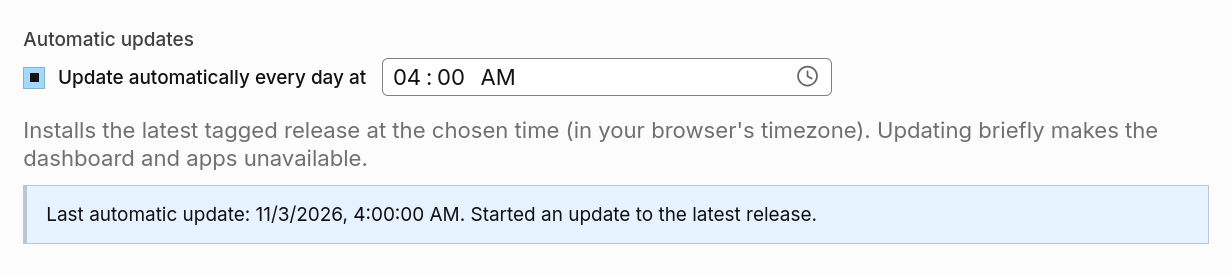
Previously, you had to press "Update & restart" to update your instance. That still works, but you can now have your instance check for and install updates every day at a time you choose. New instances have this on by default. If you're upgrading an existing instance, turn it on in the settings page.
Application Configurations #
You can now export the apps on your instance as YAML from the System page, providing something similar to a Docker Compose file. The export currently lists each app's name, source repository, and port mappings. This file can be uploaded to another instance to install the same apps.
Example media server configuration:
schema_version: 2
mode: sharing
apps:
- name: calibre-web
  port_mappings: []
  source:
    kind: remote
    ref: main
    repo_url: https://github.com/cloud-in-a-bottle/bottled-calibre-web
- name: jellyfin
  port_mappings: []
  source:
    kind: remote
    ref: main
    repo_url: https://github.com/cloud-in-a-bottle/bottled-jellyfin
- name: navidrome
  port_mappings: []
  source:
    kind: remote
    ref: master
    repo_url: https://github.com/cloud-in-a-bottle/bottled-navidrome
The sharing export option is safe to post. The private export option includes platform API token hashes, names, and expiry dates. Importing it on a new instance keeps your existing keys working, so tools like the bottle CLI can switch to the new instance without new keys.
MDNS for .local domains #
Cloud in a Bottle now works with .local domains over mDNS. Give your instance a domain like bottle.local and every app gets its own address on your local network, like notes.bottle.local, with no additional DNS setup. Support for these addresses varies by device and operating system when connecting to your instance.
Arm64 Disk Images #
Alongside the amd64 images, there's now an arm64 VM disk image. It's a qcow2 image that boots via UEFI, so you can run Cloud in a Bottle under QEMU/KVM on compatible arm64 hosts.
Fixes and Improvements #
Security Fixes #
- Visitors who aren't logged in can no longer see that a private app is installed.
- Apps can no longer make your browser send authenticated requests to another app in the background.
- Public paths now only match on whole path segments of the decoded URL, not any URL that starts with the same text.
Performance Improvements #
- System page charts now load from their own endpoint instead of pulling the whole diagnostics bundle.
- Requests to apps no longer load the root CA bundle, since they're plain HTTP to localhost.
Bug Fixes #
- The web terminal now connects behind reverse proxies.
- Opening an app during an instance update no longer leaves you stuck on the update page when the app has no
/healthendpoint. - The provider discovery endpoint returns an object again, which fixes apps that call it.
- Google sign-in works again. The OAuth callback is now at
/redirect/oauth_callback, so if you use your own Google OAuth client, register this new redirect URI with it. - Diagnostics page buttons stay disabled until the snapshot loads.